
How do I remove a document which I uploaded by mistake?
Open a ticket, specifying the requisition number and the name(s) of the document(s) to be deleted. Documents will only be deleted if the requisition is still in progress.
I cannot open a .EML file document. How do I do it?
Kindly contact IT Services to get help on this issue.
I cannot add or view documents. What can I do?
Older versions of AIMS Web opened uploaded documents in a different browser window. This technique was prone to stop you from viewing documents if your pop-up blocker interfered.

The new AIMS web, as shown above, opens documents in the same window.
I cannot save my requisition. What is the problem?
Be sure to take a look at the error displayed by the screen as indicated in the screenshot below.
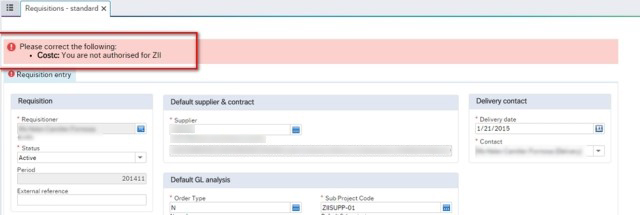
If you still cannot understand what is necessary, contact us by sending a screenshot of the full list of errors encountered.
Error says "You are not authorised for". What should I do?
You may have chosen a vote (sub-project) for which you do not have access to. If the wrong vote was chosen, select the correct one. If you believe you should have access to the chosen vote, open a ticket specifying the vote you need to have access to.
Error says "Illegal value entered". What does this mean?
AIMS expects certain fields to be filled in precisely. Many times, these fields are accompanied with a field help button (denoted by three dots on the right of the field). However, one may type in directly in these fields. Should AIMS not find the item you have entered, you will be presented with this error. In this case, the error is helping you determine which field has been wrongly filled.
Error while trying to perform Goods Receipting / Goods return. What does it mean?
When specifying your purchase order number in the Goods receipt or Goods return screens and face a "Serious Error", this means that you do not have access to the purchase order you are trying to load. If this seems to be incorrect, please get in touch with the AIMS office.
I have many items in my order but my vote(sub-project) does not have enough funds. Can I split costs against different lines in my requisition?
You can assign a different vote (sub-project) against each individual line by clicking on the applicable line in the requisition details section and then updating the applicable vote (sub-project) in GL Analysis section, as long as you have access to the different sub-projects. In this way, the cost may be split among multiple votes in the same requisition.
I have one item in my order but my vote does not have enough funds. Can I "split" the row?
Yes! Create 2 lines in the order for the same item, splitting the cost among them by choosing the applicable vote in the GL Analysis section. As stated in the above question, you need to have access to the different sub-projects you are using. In the description for the item (or in the workflow log), provide information that refers to the use of different votes within the same requisition. This will avoid misunderstandings with the supplier, who may erroneously bring more items upon delivery.
How do I remove unwanted requisition lines?
Once a requisition number is generated, you can only "Close" any undesired requisition line(s); lines cannot be completely deleted. Use the Close button instead of the Delete button.

This will put the quantity to zero and the status of the line will show as Closed. The resulting Purchase Order will not include closed lines.
How do I raise a requisition for subsistence allowance through AIMS?
Subsistence (per diem) allowance is applied for through AIMS. The amount needs to be split into 2, representing 70% and 30% respectively. In the below example, the payee is to be reimbursed an amount of €552.

Make sure you select the correct supplier code for the member of staff to be paid. You can search for a person in the same way you search for a traditional supplier. The supplier id (Resno) you choose has to also be updated in the GL Analysis area for every requisition line you enter.
Do I need to use AIMS for petty cash application purposes?
Yes. Upon initial allocation, the department will be required to raise a requisition so as to deduct the full petty cash amount from the budgetary allocation. The department will later receive the allocation granted in cash. There is no need for a goods receipt. Kindly contact Financial Planning and Control within the Finance Office for details on how this works.
My supplier is foreign and payment is requested in the local currency. Is this possible?
Foreign currency payments are possible. When selecting a foreign supplier, a default currency is specified. In many cases, this would be the correct currency. When it is not, you can change it. In the requisition details section of the screen, locate the"Currency" field and amend it accordingly. Domestic (local) suppliers have a default,non-editable currency of Euro (€).
Can my order have different currencies?
No. Create a separate requisition using a different currency for the supplier selected.
I am raising a requisition using another Currency (other than Euros), but the conversion is not being calculated correctly.
In such cases, you need to get in touch with the Operations department within the Finance Office.
How do I cancel or close a requisition?
Requisitions cannot be deleted. To cancel or terminate a requisition, the respective requisition task must be rejected before it becomes a Purchase Order (PO). If someone other than the original requisitioner rejects the requisition, it will be routed back to the requisitioner, who must also reject it to complete the cancellation process.
Important: Simply changing the status to “Closed” is not sufficient. The requisition will still remain in the approval process and appear in the task list as a pending task. Therefore, it is essential to reject any requisition that is no longer needed. (If the requisition is not currently in your task list, use the Workflow Enquiry – Requisitions screen to identify the current task owner. Then, request that they reject the task, which should trigger it to be routed back to your task list).
Note: If your requisition has already been converted into a Purchase Order, you must contact the Procurement Directorate to proceed with its closure.
My requisition was rejected and I need to make amendments. How do I do it?
The link provided in the email will take you to the “Reject / Approve” screen. You can use this screen to make amendments to the requisition.
If there is a particular element of the requisition that you are unable to change, simply go to the “Requisitions – standard” screen, and load the requisition. Go to the “Requisitions – standard” screen, click on the Open button located at the bottom of the screen, type the requisition number, press Search and single click on the desired requisition in the result, as can be seen below. Make any amendments as needed and save.
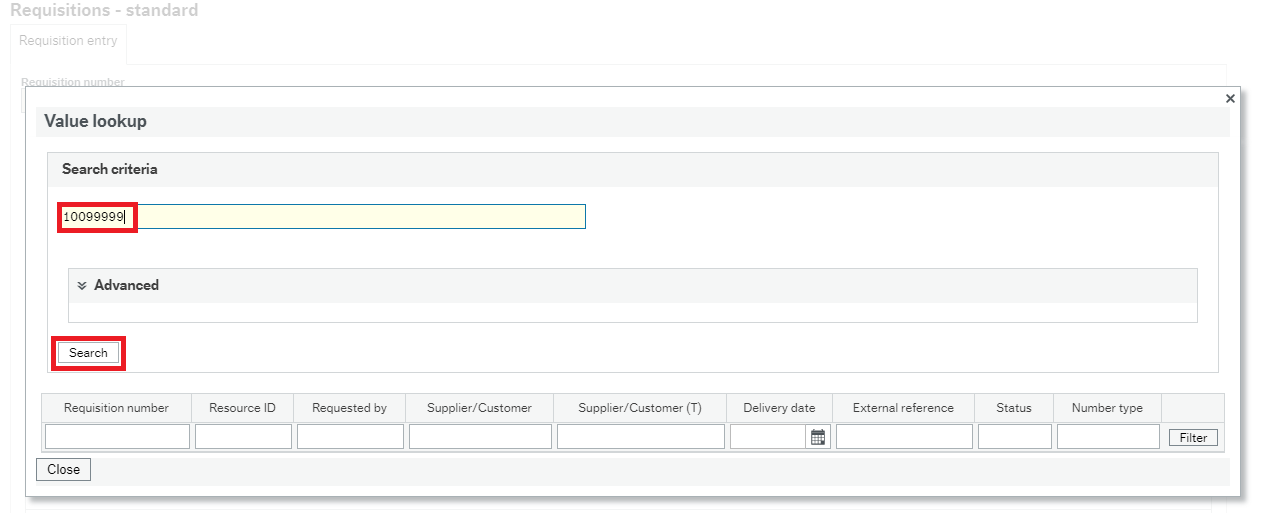
If you did access the "Requisitions - Standard" screen to make amendments, you may or may not need to go to your task list, locate the corresponding requisition task, and approve accordingly. This depends entirely on the nature of your changes. For instance, if you change the price of an item, AIMS will not require you to go to your task list and approve the task, because it will automatically send your task to the first line approver, and remove the task from your list.
An example of a change which does require you to go to the task list and approve is the addition of a file / attachment to the requisition.
I cannot find my supplier. Who do I contact?
You must fill in this form [PDF][Intranet] and submit it to Operations Department.
I cannot find a product: Who do I contact?
You must contact the Procurement Department and ask for the addition of a new product. Procurement might also guide you to use an existing product.
Whilst trying to check the status of an active requisition through a workflow enquiry, the map does not show. What do I do?
Since the new AIMS Web does not open new windows to display content, the occurrence of this issue is highly unlikely. If you do stumble upon such a problem, get in touch with us.
My requisition takes long to load. What should I do?
When creating a requisition, ensure to not exceed 20 order lines. If you have more than 20 items to be ordered, split the requisition into 2 or more requisitions. You may use the same quotes and memos. Additionally provide relevant information that the requisition is being split into multiple requisitions.
What is an asset and what do I need to do to raise a requisition for an asset?
An asset is defined as an object or service whose benefits are consumed over a number of years rather than within a year. AIMS will automatically determine if the product you are buying is an asset. You will know this by looking at the GL Analysis section. If you see a column called Asset, which will always default to the value ANK, this means you are buying an asset.
Following a new circular issued by AMU (Asset Management Unit) on 22nd November 2018, you are no longer required to ask AMU for asset codes. You can raise a requisition as usual, and AMU will receive the requisition for approval, creating asset codes and assigning them in the approval step.
How can I attach boarding passes, travel reports, and other documentation to Purchase Orders?
If Procurement requests additional documentation for travel-related orders, you can attach these documents to the Purchase Order through the Goods Receipt screen. To do this, navigate to the Goods Receipt screen and use the PO number to retrieve the order details. Click the paperclip icon and upload the documents to the "Quotations attached to Purchase Orders" folder.